Below is the config I got working. Its just a partial config because it was also running Cisco Callmanager Express. We had a web server and exchange server that needed ports forwarded from the internet and also be able to be accessed on the remote VPN side. Internet traffic was port forwarded and VPN traffic connected to its local internal IP.
ip nat inside source route-map SDM_RMAP_1 interface FastEthernet0/1 overload
ip nat inside source static tcp 192.168.1.2 25 74.7.221.154 25 route-map nonat extendable
ip nat inside source static tcp 192.168.1.2 443 74.7.221.154 443 route-map nonat extendable
ip nat inside source static tcp 192.168.1.2 1328 74.7.221.154 1328 route-map nonat extendable
ip nat inside source static tcp 192.168.1.3 22 74.7.221.155 22 route-map nonat extendable
ip nat inside source static tcp 192.168.1.3 25 74.7.221.155 25 route-map nonat extendable
ip nat inside source static tcp 192.168.1.3 53 74.7.221.155 53 route-map nonat extendable
ip nat inside source static tcp 192.168.1.3 80 74.7.221.155 80 route-map nonat extendable
ip nat inside source static tcp 192.168.1.3 110 74.7.221.155 110 route-map nonat extendable
ip nat inside source static tcp 192.168.1.3 143 74.7.221.155 143 route-map nonat extendable
ip nat inside source static tcp 192.168.1.3 443 74.7.221.155 443 route-map nonat extendable
ip nat inside source static tcp 192.168.1.3 10000 74.7.221.155 10000 route-map nonat extendable
ip nat inside source static 192.168.1.7 74.7.221.157 route-map nonat
ip route 0.0.0.0 0.0.0.0 74.7.221.153
!
logging esm config
access-list 100 remark CCP_ACL Category=4
access-list 100 remark IPSec Rule
access-list 100 permit ip 192.168.1.0 0.0.0.255 192.168.2.0 0.0.0.255
access-list 101 remark CCP_ACL Category=4
access-list 101 permit ip 192.168.1.0 0.0.0.255 any
access-list 102 remark CCP_ACL Category=16
access-list 102 remark IPSec Rule
access-list 102 deny ip 192.168.1.0 0.0.0.255 192.168.2.0 0.0.0.255
access-list 102 permit ip 192.168.1.0 0.0.0.255 any
access-list 150 deny ip host 192.168.1.2 192.168.2.0 0.0.0.255
access-list 150 permit ip host 192.168.1.2 any
access-list 150 deny ip host 192.168.1.3 192.168.2.0 0.0.0.255
access-list 150 permit ip host 192.168.1.3 any
access-list 150 deny ip host 192.168.1.7 192.168.2.0 0.0.0.255
access-list 150 permit ip host 192.168.1.7 any
!
!
!
!
route-map SDM_RMAP_1 permit 1
match ip address 102
!
route-map nonat permit 10
match ip address 150
!
Below is the trunk configuration info we used to make Vicidial work with bandwidth.com. The key is adding a + sign to outgoing calls. bandwidth only accepts E.164 numbers.
exten => _91XXXXXXXXXX,2,Dial(SIP/+${EXTEN:1}@bandwidth,,tTo)
Below is the complete config. Make sure you add 9 prefix on your campaigns.
[bandwidth]
disallow=all
allow=ulaw
port=5060
canreinvite=yes
dtmfmode=rfc2833
host=216.82.224.202
outboundproxy=216.82.224.202
qualify=300
type=friend
nat=yes
exten => _91XXXXXXXXXX,1,AGI(agi://127.0.0.1:4577/call_log)
exten => _91XXXXXXXXXX,2,Dial(SIP/+${EXTEN:1}@bandwidth,,tTo)
exten => _91XXXXXXXXXX,3,Hangup

To autoprovision your IP phones using Untangles DHCP server go to Config/Networking/advanced settings
Put your own IP address of your phone system or config file server
For Cisco Phones use:
dhcp-option=66,”172.25.30.254″
For Polycom Phone use:
dhcp-option=66,”tftp://172.25.30.254″

To route between interfaces on a Cisco ASA software 8.4 use the following command.
nat (inside,DMZ) source static any any

Here is quick tutorial on how to install iSymphony on elastix
rpm -i iSymphonyServer-2.2.0_2227-1.noarch.rpm
cd /opt/isymphony/server
./config.sh
Type in:
/opt/openfire/jre
Make iSymphony start at boot:
nano /etc/rc.d/rc.local
Copy and paste this into the file
/opt/isymphony/server/shutdown.sh
/opt/isymphony/server/startup.sh
Install the free pbx module and your good to go
Here is my Cisco router Cube confiuration with Cbeyond. This device is also routing internet traffic with NAT and VPN
Building configuration…
Current configuration : 9249 bytes
!
! Last configuration change at 17:06:31 UTC Wed Mar 23 2011 by admin
!
version 15.1
service timestamps debug datetime msec
service timestamps log datetime msec
no service password-encryption
!
hostname Router
!
boot-start-marker
boot-end-marker
!
!
logging buffered 51200 warnings
!
aaa new-model
!
!
aaa authentication login sdm_vpn_xauth_ml_1 local
aaa authorization network sdm_vpn_group_ml_1 local
!
!
!
!
!
aaa session-id common
!
no network-clock-participate wic 0
!
dot11 syslog
ip source-route
!
!
ip cef
!
!
!
ip domain name fintechcommunications.com
ip name-server 66.180.96.12
ip name-server 64.238.96.12
no ipv6 cef
!
multilink bundle-name authenticated
!
!
!
!
!
!
!
voice service voip
ip address trusted list
ipv4 192.168.22.212
ipv4 192.168.1.8
ipv4 192.168.1.4
ipv4 192.168.1.6
ipv4 192.168.1.7
ipv4 192.168.1.5
allow-connections h323 to h323
allow-connections h323 to sip
allow-connections sip to h323
allow-connections sip to sip
supplementary-service h450.12
no supplementary-service sip moved-temporarily
no supplementary-service sip refer
sip
header-passing sip-sip
error-passthru
registrar server expires max 3600 min 3600
asserted-id pai
localhost dns:sipconnect.lax0.cbeyond.net
no update-callerid
history-info
midcall-signaling passthru
privacy-policy passthru
!
voice class codec 1
codec preference 1 g711ulaw
codec preference 2 g711alaw
codec preference 3 g729r8
!
voice class sip-profiles 3
request INVITE sip-header Diversion remove
!
!
voice register global
max-dn 56
max-pool 14
!
!
!
voice translation-rule 103
rule 1 /^\([2-9]………\)/ /+1\1/
rule 2 /^\(………..\)/ /+\1/
rule 3 /^\(………..\)/ /+\1/
!
!
voice translation-profile AddPlusForOCS
translate calling 103
!
!
voice-card 0
dsp services dspfarm
!
crypto pki token default removal timeout 0
!
crypto pki trustpoint TP-self-signed-4115930597
enrollment selfsigned
subject-name cn=IOS-Self-Signed-Certificate-4115930597
revocation-check none
!
!
crypto pki certificate chain TP-self-signed-4115930597
certificate self-signed 01
30820259 308201C2 A0030201 02020101 300D0609 2A864886 F70D0101 04050030
31312F30 2D060355 04031326 494F532D 53656C66 2D536967 6E65642D 43657274
69666963 6174652D 34313135 39333035 3937301E 170D3130 31303233 32303134
30345A17 0D323030 31303130 30303030 305A3031 312F302D 06035504 03132649
4F532D53 656C662D 5369676E 65642D43 65727469 66696361 74652D34 31313539
33303539 3730819F 300D0609 2A864886 F70D0101 01050003 818D0030 81890281
8100E484 DAF0ED87 E1F979E8 D0A6C630 6369BAFD 2F8C4B3C 07CF9A67 6B1A6BEE
B9506A0F B7200800 8BD32A9B F458EA47 26E16E25 3C9CEC9E 6A0CFF3E 0A5FD71E
533E407D 464EBCE4 BAA207DB 91C7DD91 E90FD5BE F8227A83 AF142B88 F3567B3F
0CFC7BD4 5FDB91E7 25A80338 1A7919AA B30A8AE3 27709D93 3C536EFA A9180CBA
63010203 010001A3 8180307E 300F0603 551D1301 01FF0405 30030101 FF302B06
03551D11 04243022 8220526F 75746572 2E66696E 74656368 636F6D6D 756E6963
6174696F 6E732E63 6F6D301F 0603551D 23041830 16801488 C0A982B5 B855FEA9
01638892 F686E641 9109DD30 1D060355 1D0E0416 041488C0 A982B5B8 55FEA901
638892F6 86E64191 09DD300D 06092A86 4886F70D 01010405 00038181 00A8FD12
813B61B7 FA59258C 33DF9492 ABA41BCC CEE24A6D 91AD0660 E246BC77 0774CF61
1A7A31B2 3D149F97 C780CD4B C8306F96 75EE6DB9 F29A4CF1 BA09C3EA D052B8BC
7B990641 C98A509B 8FCE7ABB 10BD91F8 67CB7916 571A5B45 AECC228D 37730139
A977E465 8D8D04C5 8A5F19CB 468C3DED 3D221847 37A8851E E481C864 9D
quit
!
!
license udi pid CISCO2811 sn FTX1236A3AZ
username admin privilege 15 password 0 XXXXX
username fintech secret 5 XXXXXXXX!
redundancy
!
!
controller T1 0/0/0
!
!
crypto ctcp
!
crypto isakmp policy 1
encr 3des
authentication pre-share
group 2
crypto isakmp key XXXX address 0.0.0.0 0.0.0.0
!
crypto isakmp client configuration group fintech
key XXXXX pool SDM_POOL_1
acl 101
save-password
crypto isakmp profile sdm-ike-profile-1
match identity group fintech
client authentication list sdm_vpn_xauth_ml_1
isakmp authorization list sdm_vpn_group_ml_1
client configuration address respond
virtual-template 1
!
!
crypto ipsec transform-set ESP-3DES-SHA esp-3des esp-sha-hmac
crypto ipsec transform-set ESP-3DES-SHA1 esp-3des esp-sha-hmac
!
crypto ipsec profile SDM_Profile1
set transform-set ESP-3DES-SHA
set pfs group2
set isakmp-profile sdm-ike-profile-1
!
!
crypto dynamic-map SDM_DYNMAP_1 1
set transform-set ESP-3DES-SHA1
match address 100
!
!
crypto map SDM_CMAP_1 65535 ipsec-isakmp dynamic SDM_DYNMAP_1
!
!
!
!
!
!
interface FastEthernet0/0
ip address 192.168.1.6 255.255.255.0
ip nat inside
ip virtual-reassembly in
duplex auto
speed auto
!
interface FastEthernet0/1
description $ETH-WAN$
ip address 74.7.XXX.XXX 255.255.255.248
ip nat outside
ip virtual-reassembly in
duplex auto
speed auto
crypto map SDM_CMAP_1
!
interface Virtual-Template1 type tunnel
ip unnumbered FastEthernet0/0
tunnel mode ipsec ipv4
tunnel protection ipsec profile SDM_Profile1
!
ip local pool SDM_POOL_1 192.168.1.225 192.168.1.235
ip forward-protocol nd
ip http server
ip http authentication local
ip http secure-server
!
!
ip nat inside source route-map SDM_RMAP_1 interface FastEthernet0/1 overload
ip nat inside source static tcp 192.168.1.2 25 74.7.221.xxx.xxx route-map nonat extendable
ip nat inside source static tcp 192.168.1.2 443 74.7.221.xxx.xxx 443 route-map nonat extendable
ip nat inside source static tcp 192.168.1.2 1328 74.7.221.xxx.xxx 1328 route-map nonat extendable
ip nat inside source static tcp 192.168.1.3 22 74.7.221.xxx.xxx 22 route-map nonat extendable
ip nat inside source static tcp 192.168.1.3 25 74.7.221.xxx.xxx 25 route-map nonat extendable
ip nat inside source static tcp 192.168.1.3 53 74.7.221.xxx.xxx 53 route-map nonat extendable
ip nat inside source static tcp 192.168.1.3 80 74.7.221.xxx.xxx route-map nonat extendable
ip nat inside source static tcp 192.168.1.3 110 74.7.221.xxx.xxx route-map nonat extendable
ip nat inside source static tcp 192.168.1.3 143 74.7.221.xxx.xxx route-map nonat extendable
ip nat inside source static tcp 192.168.1.3 443 74.7.221.xxx.xxx route-map nonat extendable
ip nat inside source static tcp 192.168.1.3 10000 74.7.221.xxx.xxx10000 route-map nonat extendable
ip route 0.0.0.0 0.0.0.0 74.7.221.xxx.xxx
!
logging esm config
access-list 100 remark CCP_ACL Category=4
access-list 100 remark IPSec Rule
access-list 100 permit ip 192.168.1.0 0.0.0.255 192.168.2.0 0.0.0.255
access-list 101 remark CCP_ACL Category=4
access-list 101 permit ip 192.168.1.0 0.0.0.255 any
access-list 102 remark CCP_ACL Category=16
access-list 102 remark IPSec Rule
access-list 102 deny ip 192.168.1.0 0.0.0.255 192.168.2.0 0.0.0.255
access-list 102 permit ip 192.168.1.0 0.0.0.255 any
access-list 150 deny ip host 192.168.1.2 192.168.2.0 0.0.0.255
access-list 150 permit ip host 192.168.1.2 any
access-list 150 deny ip host 192.168.1.3 192.168.2.0 0.0.0.255
access-list 150 permit ip host 192.168.1.3 any
access-list 150 deny ip host 192.168.1.7 192.168.2.0 0.0.0.255
access-list 150 permit ip host 192.168.1.7 any
!
!
!
!
route-map SDM_RMAP_1 permit 1
match ip address 102
!
route-map nonat permit 10
match ip address 150
!
!
!
!
control-plane
!
!
voice-port 0/1/0
!
voice-port 0/1/1
!
voice-port 0/1/2
!
voice-port 0/1/3
!
!
!
mgcp profile default
!
!
dial-peer voice 9 voip
destination-pattern .T
session protocol sipv2
session target sip-server
incoming called-number 9T
voice-class codec 1
dtmf-relay rtp-nte
!
dial-peer voice 1 voip
description lync
translation-profile outgoing AddPlusForOCS
destination-pattern 949…….
session protocol sipv2
session target ipv4:192.168.1.7
session transport tcp
incoming called-number 949…….
voice-class sip dtmf-relay force rtp-nte
voice-class sip early-offer forced
voice-class sip profiles 3
voice-class sip block 183 sdp present
dtmf-relay rtp-nte
codec g711ulaw
no vad
!
dial-peer voice 2 voip
description Cucm8
destination-pattern 9492003010
session protocol sipv2
session target ipv4:192.168.1.4
incoming called-number 9492003010
voice-class codec 1
voice-class sip dtmf-relay force rtp-nte
dtmf-relay rtp-nte
no vad
!
!
sip-ua
credentials username 949XXXXXXX password 7 XXXX realm default
authentication username 949XXXXXXX password 7 XXXXX no remote-party-id
retry invite 2
retry register 10
timers connect 100
registrar dns:sipconnect.lax0.cbeyond.net expires 3600
sip-server dns:sipconnect.lax0.cbeyond.net
connection-reuse
host-registrar
!
!
!
telephony-service
no auto-reg-ephone
max-ephones 35
max-dn 144
max-redirect 5
max-conferences 8 gain -6
web admin system name admin secret 5 XXXXXXX transfer-system full-consult
!
!
ephone-dn 34
number 9492003010
description SIP VM trunk registration
preference 10
!
!
!
line con 0
line aux 0
line vty 0 4
privilege level 15
transport input telnet ssh
transport output telnet ssh
line vty 5 100
transport input telnet ssh
transport output telnet ssh
!
scheduler allocate 20000 1000
end
This the trunk configuration that I used to make dial through a Cisco UC520, UC540, UC560 or Cisco CME phone system. Notice the two 9’s _991NXXNXXXXXX . Vicidial discards one of the 9’s and Cisco remove the other and passes 10 digits to your carrier.
[uc520]
type=friend
context=outbound
host=10.1.1.1
allow=all
nat=no
canreinvite=yes
qualify=yes
insecure=very
exten => _991NXXNXXXXXX,1,AGI(agi://127.0.0.1:4577/call_log)
exten => _991NXXNXXXXXX,2,Dial(SIP/${EXTEN:1}@uc520,,o)
exten => _991NXXNXXXXXX,3,Hangup
When I’m not troubleshooting IT stuff I like to work on Engines. A computer that runs your engine. I can hookup my laptop and program my engine now, Cool.
Ford EDIS Megasquirt Conversion 289 302 351
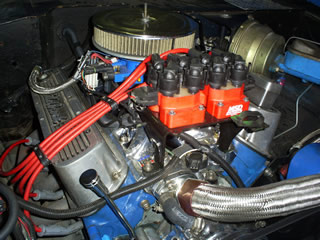
Why Do this Conversion
- Bigger spark (no spark lost from the rotor to cap)
- Precise timing (timing chain slack and distributor gear wear can throw off timing)
- Control timing curves from your computer
- Larger spark plug gap
- Proven Technology (used on ford cars and truck for the last 15 years)
Parts List
- MSD or Motorcraft Coil Pack MSD-8241
- EDIS 8 Module
- VR Pickup
- Megasquirt or Megajolt
- Trigger Wheel
- 4 Bolt harmonic balancer
- Single Pair shielded wire
- Aluminum scrap.
- EDIS Plug wires
I started considering this conversion when I switched my 1966 Bronco to Megasquirt. Having full injection when off roading is a must. With fuel injection you do not need to change jets or metering rods at high altitude. Now I have immediate throttle response and can stomp at any angle. I used a Holley-projection 700CFM throttle body.
Engine Specs
- 289 Cubic Inch engine
- Edelbrock Performer RPM Air-Gap Manifold
- Holley Pro-jection 700 CFM throttle Body
- Megasquirt II with 3.57 Board
- Heavily ported heads, hardened seats, Enlarge valves, Comp Cams triple springs
- Comp Cams Roller Rockers
- Comp Cams retro fit roller cam conversion XR282RF-HR10
- Headman Headers
- Victor Series Water Pump
- Billet Pulleys
Building The Trigger Wheel and VR Mount
I used my drill press to drill the 4 evenly spaced holes in the trigger wheel. I lucked out because I basically eyeballed it.
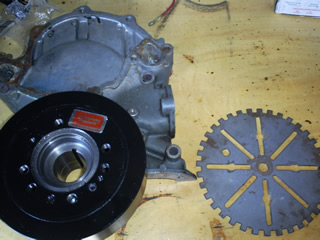
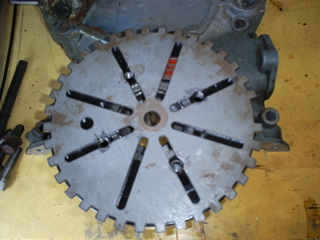

Building the Crank trigger wheel and VR Mount.
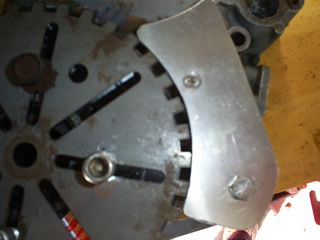
EDIS-8: missing tooth is exactly five teeth (50°) ahead of the VR sensor.
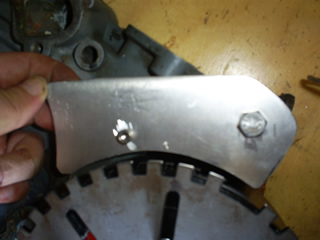

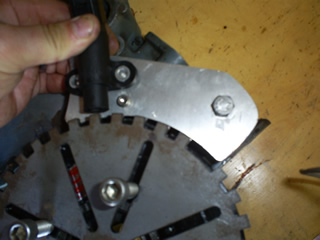
Having an extra timing chain cover made building the VR sensor mount allot easier. Most off this was just eyeballing. No formulas or calculations.


Parts Preparation
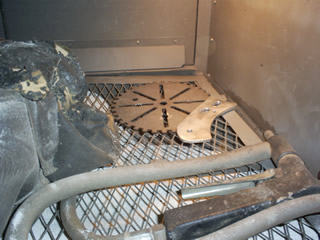
Sand Blast Cabinet
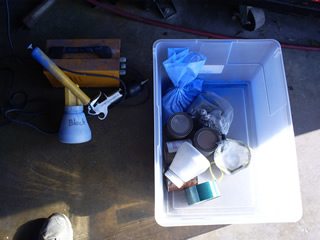
Harbor Freight Powder coating machine
Powder Coated and ready for Oven
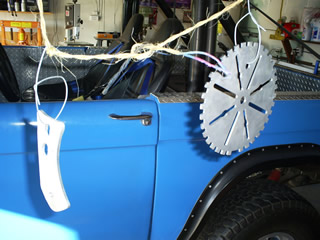

Put in Oven
325 degrees for 15 Minutes. Beware! This is sure to activate angry wife syndrome.


Finished Wheel and Mount

First Mounting
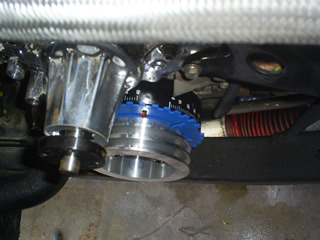
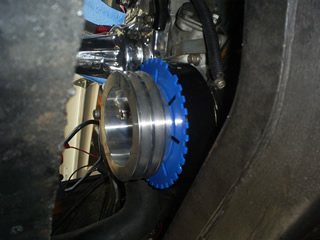
Testing VR Mount
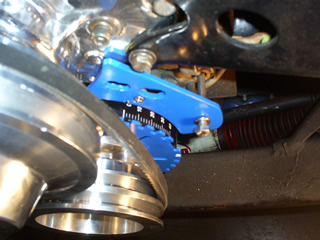
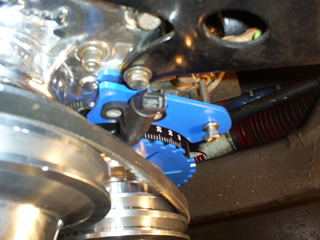
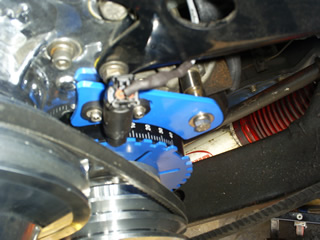
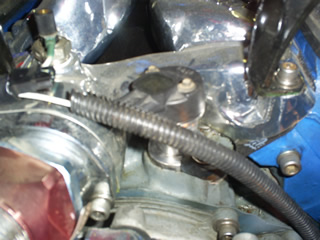
Cam Position Sensor off an Explorer 5.0. The only point of this part is to drive the oil pump and cover the hole left by the distributor.
Mounting Coil Packs and building wires. I used the coil pack mount off a 5.0 Explorer.
5.0 V8
cylinder locations
4//////////////8
3//////////////7
2//////////////6
1//////////////5
coil idetification
4 7 ///////////////3 5
8 2 ///////////////6 1
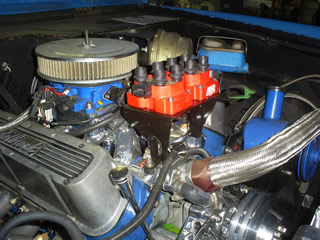
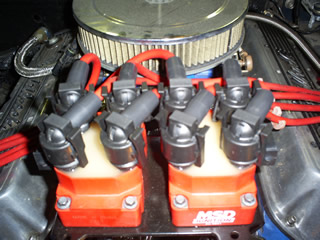

Mounting the EDIS Module and Megasquirt. This is Mounted under dash. Megasquirt is awesome.

Finished Product
I was using an MSD mechanical advance distributor and 6AL before the upgrade. Now I can control timing curves through Megasquirt. I can also run much bigger spark plug gaps. The system is way more precise then running a distributor. I will be adding an MSD DIS-4 Soon.
| hit counter from website-hit-counters.com |
This page is hosted and created by Fintech Communications, Inc.
The other day I was having Sangoma A102D D channel problems. The PRI would lose connectivity after a few hours. We would have to restart asterisk to make the PRI come up again. We were getting the following errors.
[Mar 16 04:02:08] WARNING[3117] chan_dahdi.c: No D-channels available! Using Primary channel 24 as D-channel anyway!
[Mar 16 04:02:12] WARNING[3117] chan_dahdi.c: No D-channels available! Using Primary channel 24 as D-channel anyway!
[Mar 16 04:02:16] WARNING[3117] chan_dahdi.c: No D-channels available! Using Primary channel 24 as D-channel anyway!
[Mar 16 04:02:20] WARNING[3117] chan_dahdi.c: No D-channels available! Using Primary channel 24 as D-channel anyway!
[Mar 16 04:02:24] WARNING[3117] chan_dahdi.c: No D-channels available! Using Primary channel 24 as D-channel anyway!
[Mar 16 04:02:28] WARNING[3117] chan_dahdi.c: No D-channels available! Using Primary channel 24 as D-channel anyway!
We fixed this issue by doing a firmware upgrade. We were running firmware verison 29 and the latest was 37. Maybe there was something in the driver the firmware did not like.
Wanpipe Linux AFT Firmware Update
AFT Firmware Update Instructions
Latest AFT Firmware Files: ftp.sangoma.com/firmware
To determine your current firmware version: Firmware Version Instructions
–> wanrouter hwprobe
NOTICE: If you are using Netborder Express Gateway, the wanpipe directory is located in the sangoma/ directory inside your setup .tar.gz. Also, since Netborder express does not use the wanpipe configuration files to start the drivers (but instead its own pstn-config.xml file) in order to stop manually all devices before proceeding with the firmware update you may need to execute: “wanrouter stop force”, that will stop all devices even if there is no wanpipex.conf in /etc/wanpipe
The Firmware Update utility is located in: wanpipe/util/wan_aftup
directory which was created by untaring the wanpipe release.
If you are running under Trixbox, this utility is located in: /etc/wanpipe/firmware/wan_aftup
eg: cd wanpipe/util/wan_aftup or cd /etc/wanpipe/firmware/wan_aftup
- Download and Save the latest BIN file from ftp.sangoma.com/firmware into wanpipe/util/wan_aftup or /etc/wanpipe/firmware/wan_aftup(for Trixbox) directory.
- Make sure wanpipe modules are unloaded
#>wanrouter stop
#>wanrouter modules #Check for loaded wanpipe modules - Start update program
./update_aft_firm.sh
- Specify interface name that corresponds to your AFT card, based on the hw probe list displayed. (you must write the actual interface name, and not just press enter)
- Specify the desired firmware version from the list displayed.
- At this point firmware update will begin…
- Once the flashing is done, select Y to reload firmware.
(This step only reloads flash, not your machine!)IMPORTANT:
If you select N for this step, you will have to reboot the machine for the new firmware to take effect.
- End of firmware update
All AFT cards contain DUAL Firmware flash devices. The primary flash device, is used to bootstart the AFT card on boot up. During AFT card flashing, the new firmware is stored into the primary flash device.
If a machine crashed during card flashing or for some reason flashing failes that causes primary flash device to become corrupted, the card would be rendered useless. In this scenario the secondary flash device can be selected to boot the card, which would allow a user to re-flash the primary device again.
In order to select the secondary flash device, one must boot the AFT card with firmware recovery jumpers set. Please refer to sections below for firmware jumper settings of each AFT card.
- Shutdown the machine and take out the AFT card
- Set the Firmware recover jumper. Refer to here for each AFT card.
- Restart the machine with firmware recover jumpers set.
- Proceed to re-flash the card, as described above.
- Once re-flashing is completed, shutdown the machine and remove flash recover jumpers.
- Restart the machine with new card firmware.
This module will fix the Trixbox 2.8 queue problem.
upload it to /usr/lib/asterisk/modules
Make sure you backup your current module
The following module works with Trixbox 2.8.03 and 2.8.04. I have used this module on both systems.
sponsors
